
I’ve always been really fascinated by sleep. And have often wondered how well I’m actually sleeping.
I know that I’m not getting the best sleep of my life at the moment, because I have children who often still wake in the night, and early in the morning.
But I’ve been really interested to know if the sleep I am getting is actually quality sleep or not.
So I jumped at the chance to review a brilliant sleep tracker recently.

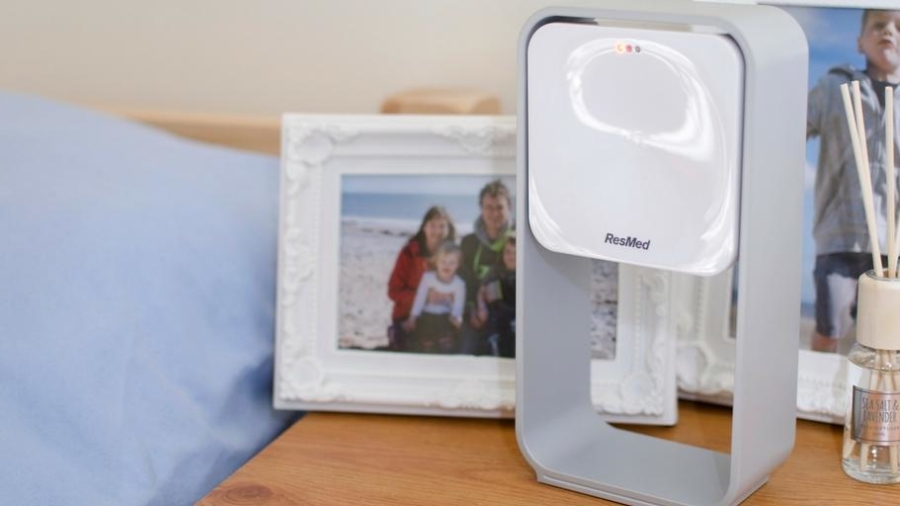
The S+ by ResMed tracks your sleep at night to help you in several ways.
- It helps you create the right environment for a good night’s sleep. The tracker measures the light levels and temperature in your room and lets you know if either of these should be adjusted for optimum sleep conditions.
- It relaxes you. You can use the soothing sounds option on the S+ app to listen to relaxing sounds that sync up with your breathing to help you fall asleep.
- It clears you mind. There’s a memo recorder built in to the app so you can record a voice message or type a quick text memo to yourself with the things you need to get done the next day. So they’re out of your head, allowing you to relax more and get to sleep.
- It wakes you gently. The S+ has a ‘smart alarm’ option to wake you up in a window of light sleep, which makes you feel much more refreshed than waking up from deep sleep or rem sleep.
- It helps you understand your sleep. This is a big one for me. The feedback from the tracker lets you really understand how well you are (or aren’t) sleeping. Then it offers you advice to help improve things.

The S+ is the world’s first non-contact sleep tracker, and that’s one of the things I love about it.
With other trackers you have to wear something, or have something in the bed with you, to get accurate results.
The S+ though, sits nicely on your bedside table and tracks your sleep from there.
In the box you get the S+ device (the pod), the frame that holds the pod in the best position (it needs to be at a certain level above your mattress), a power supply unit and a usb power cable.
It’s really easy to set up the S+. You just need to download the S+ app to your phone, then plug the device in and sync it up to your phone. What’s great is that the power supply unit that’s provided has 2 usb sockets on it, so as long as you have the right cable, you can charge your phone and the S+ at the same time with it. This is quite important as you do need to keep your phone charged through the night to keep it synced up with the pod.
Every night before you go to sleep you enter a few bits of information about your day into the app. Things like how much exercise you’ve done, if you’ve drunk any alcohol and how much caffeine you’ve consumed.
Then you can choose to clear your mind, set a smart alarm and/or listen to the soothing sounds to help you drift off to sleep.
While you’re sleeping the S+ monitors your breathing (by tracking how your chest rises and falls) and your overall movements to record how long you were in each stage of sleep, and how much you were disturbed in the night.
Then in the morning, after you stop recording, it feeds the information back to you.

Most days I’ve been getting at least two bits of feedback about my sleep the previous night.
I’ve been finding this feedback really interesting. I know that on the day I got the feedback above I woke up still feeling quite tired. So it was fascinating to be told that I didn’t get that much deep sleep the night before.
One slight issue I have is that, obviously, the S+ doesn’t take into account the fact that I have children. So it offers advice like that above, to try and help me get more deep sleep. When I think the issue is most likely that I’m not going into a real deep sleep because I’m half listening out for my children all night. This is an area I really want to look into more, but I do think it must be a big factor.
On the plus side though, the app does let you feedback to the feedback!
So I can let it know that the advice to get some more exercise isn’t that relevant to me, and then it will start to provide other bits of advice for me that might be more relevant and helpful.
As well as the daily feedback, the S+ app also creates a chart each day to breakdown how you slept the night before. And this is all kept in a ‘history’ tab so you can look back through all the previous nights and see if there’s a pattern to your sleep.

This feature in particular is really useful, because you can start to pick out patterns in your sleep.
That combined with the helpful suggestions from the app can really help you to work out what action you can take to improve your sleep.
You might find, for example, that your sleep is being disturbed every night when your partner comes to bed. It might be that they make a lot of noise, or that they turn a light on as they get ready for bed. Both of these things can interfere with your sleep. And when you know that’s a factor, then you can have a chat with them and ask them to keep it down, or keep it dark!
I’ve been finding the S+ really helpful in helping me understand my sleep patterns, and to work out why I so often wake up not feeling particularly well rested.
It seems that, for me, it’s a combination of not getting enough deep sleep and often being woken up from REM sleep (thanks kids!). So, knowing that, I can start to take action to improve things. Like setting a smart alarm to wake me gently from light sleep, a little before the children generally start shouting.

My overall feelings about the S+ sleep tracker are really positive.
I think it looks really nice, and feels good quality too. I like that you can take the pod out of the frame if you want to take it with you when you’re away from home. But I like the way the pod in its frame looks sitting on my bedside table!
It’s really easy to set up, with clear instructions to follow. And it’s quite a nice bedtime routine now to answer the questions about my day, clear any thoughts from my head with the memo recorder, and set the smart alarm for the next day.
If you have trouble sleeping, or find that you don’t really feel rested in the mornings then I would definitely recommend the S+ to help you track your sleep and work out what your big problems are.
Their studies found that 80% of people who initially had a low sleep score of about 30-40 saw an improvement in their sleep quality, and quantity, in just a week.
Often we just need some information to go on, to make changes to our routines and our environment, to help improve our sleep.

If only it could train my children not to wake me in the middle of the night, or too early in the morning!
It’s not designed to teach children to sleep better though I’m afraid. But what it does do for parents is help you maximise the sleep that you do get, so you can feel as rested as possible.
You can find out all the details of the S+, or just go straight ahead and buy one, on their website – splus.resmed.com
I was sent the S+ sleep tracker for the purposes of this review, but all words and opinions are my own.

Good review, Madeline. Hope it helps you to sleep better! Your father used to cough loudly on the landing when he got up early so that we all knew he was there. …now he just coughs in our bedroom. . Funny, that.
Oh my God this looks insane!!! I am definitely in need of ways to help me have a better nights sleep! Despite my 7 month old still night feeding up to 5 times a night, even before this I was terrible at sleeping and I would constantly wake up in the night. This looks and sounds very interesting and might have to purchase my own! Thanks for sharing!! #KCACOLS xx
It really is useful at helping you work out what your sleep issues are, and offers some good advice to help you improve things. Just a shame it can’t teach our children to sleep through the night! x
I think this is a great idea and I think I would find it very interesting to see how my sleep was being effected by Mia! I like the fact you can remind yourself of things with it as I’m always thinking of things i need to do just as I’m about to drop off! It sounds like it has helped you out and been useful 🙂
#KCACOLS
That function to help clear your mind is really useful, I’m like you, always thinking of important things just as I’m going to sleep, and I just know I’ll forget them in the morning! x
This looks like such a good idea! Great review! Love the idea of the memo recorder. I could do with one of them. My mind is always full!
Thanks for linking up with #KCACOLS and hope to see you again soon x
I could do with one of these in my life. My sleep is all over the place and it would be really interesting. I love the memo recorder, what a fab feature x #KCACOLS
This looks great! I don’t think I would cope with wearing a device as I am a bit sensitive to things like that. #KCACOLS
This is a really great alternative to the trackers that you have to wear, it just sits there quietly on your bedside table! x